Currah Speech 64 — The Voice Messenger
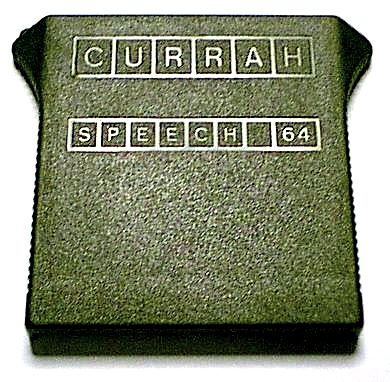
Image gallery
Find one for your collection
Looking for a Currah Speech 64? Explore current eBay listings for this vintage speech cartridge.
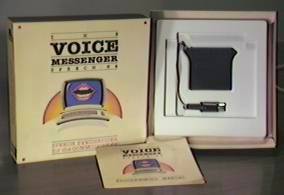
Search eBayThe Currah Speech 64, also marketed as the Voice Messenger, gave the Commodore 64 an electronic speaking voice. The small cartridge plugged into the computer’s expansion port and added speech commands to Commodore BASIC. Its built-in software meant owners could start experimenting without first loading a program from disk or cassette. In January 1985, COMPUTE! announced the Voice Messenger at a suggested U.S. price of $49.95.
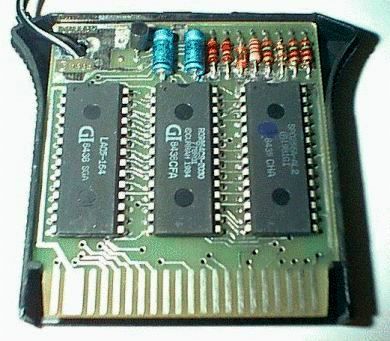
At its heart was the General Instrument SP0256-AL2 speech synthesizer. Currah paired the chip with an eight-kilobyte ROM containing its operating software and text-to-speech translator. The translator converted written words into sequences of speech sounds, which the chip then spoke. This distinction matters: the speech chip generated the voice, while Currah’s software worked out what sounds to send it.
From BASIC to spoken words
Unlike speech systems restricted to a built-in list of words, the Voice Messenger assembled words from individual speech sounds called allophones. Programmers could give it ordinary English text or specify the allophones themselves for greater control over pronunciation.
Getting started was straightforward. INIT enabled the cartridge’s speech system, and SAY "HELLO" made the computer speak. The two voice settings offered a lower or higher voice: SAY 0 "HELLO" selected the low voice, while SAY 1 "HELLO" selected the high voice.
Automatic pronunciation was convenient, but English spelling could still trip it up. Names, unusual words, and irregular spellings sometimes needed phonetic adjustments. Direct allophone entry let the programmer fine-tune the sounds instead of relying entirely on the text-to-speech translator.
The cartridge could also speak keys as they were pressed. KON enabled this keyboard feedback, and KOFF silenced it. This gave even routine typing a distinctive electronic accompaniment. BYE temporarily suspended the speech system.
Speaking while the computer keeps working
The Voice Messenger could speak while a BASIC program continued running. A buffer held up to 256 allophones waiting to be spoken, and the special variable SP% reported how much space remained.
That was useful because a program could generate speech instructions much faster than the cartridge could say them. Several consecutive SAY commands could fill the buffer, causing additional speech to be omitted. Checking SP% allowed the programmer to pace longer messages.
The cartridge preserved the memory normally available to BASIC programs, although its operating system did use some locations in the C64’s $C000 memory area. It is therefore more accurate to say that it did not reduce BASIC’s workspace than to say it used no computer memory at all.
A voice through the computer’s own sound system
The supplied audio connection fed the synthesized speech into the C64’s external sound input, allowing it to emerge through the television or monitor speaker alongside the computer’s normal audio. A contemporary announcement highlighted this arrangement as part of the cartridge’s compact design.
That connection also offered an interesting opportunity for experimentation. Commodore’s SID sound chip could route its external audio input through its filter. With suitable programming, the speech could therefore be filtered and its tonal character altered—not simply played alongside the SID’s own voices.
Speech clock and voice pitch
A distinctive part of the Currah’s design is that its speech clock could be controlled by the processor, rather than relying on the fixed 3.120 MHz resonator used in many SP0256 designs. Changing the clock changed the voice’s pitch. The low- and high-voice recordings below demonstrate the difference.
Adding expression and taking direct control
Direct allophone entry also supported intonation. Uppercase allophone symbols raised the intonation, while lowercase symbols used the normal setting. Carefully placing these changes could add emphasis to words and make a phrase sound less uniform.
For programmers who wanted closer control, the manual included machine-language instructions, example code, and tables of decimal and hexadecimal allophone codes.
These codes represented sounds rather than alphabet letters. The absence of separate symbols for “X” and “Q” did not prevent the cartridge from saying words containing those letters; their pronunciation had to be constructed from the appropriate combination of sounds.
When text adventures found their voice
One of the cartridge’s most interesting companions was Easy Speech 64, a separate disk-based program from Research In Speech Technology. It intercepted text sent to the screen and passed it to the Voice Messenger, allowing existing software to speak without having speech commands added to the original program.
A December 1985 review in Ahoy! reported that it worked with Infocom adventures, including Zork and Wishbringer. Easy Speech also offered editable pronunciation dictionaries, letting users correct troublesome words and save their changes to disk. Reading an adventure aloud slowed play considerably, so speech could be toggled with Ctrl+V.
For an owner in the mid-1980s, that was a memorable transformation: a familiar computer could suddenly narrate an imaginary world in its own unmistakable electronic accent.
Hear the Voice Messenger
The alphabet
SAY "A B C D E F G H I J K L M N O P Q R S T U V W X Y Z"
Numbers zero through nine
SAY "1 2 3 4 5 6 7 8 9 0"
Voice Messenger — low voice
SAY 0 "VOICE MESSENGER SPEECH SIXTY 4"
Voice Messenger — high voice
SAY 1 "VOICE MESSENGER SPEECH SIXTY 4"
By your command
SAY 0 "BY YOUR COMMAND"
Specifications
- Model
- Voice Messenger / Currah Speech 64
- Type
- Speech / voice synthesis cartridge
- Manufacturer
- Currah
- Introduced
- 1984; end of manufacture not recorded
- Connection
- Cartridge expansion port and external audio input
- Computer platforms
- Commodore 64 and SX-64; the original specifications also list the C64/128 expansion port
- Vocabulary
- Words assembled from allophones, rather than a fixed word list
- Voice settings
- High and low pitch
- Programming
- Commodore BASIC: INIT, KON, KOFF, SAY, BYE; machine-language access
- Features
- Speech and computer music can be heard together
Making your Commodore 64 talk
| Command | Function |
|---|---|
| INIT | Initializes the voice unit. After INIT is executed, a copyright message appears on the screen, and the Voice Messenger will say the name of any letter or symbol that is hit on the keyboard. (Graphics symbols are merely voiced as "graphic".) The Voice Messenger uses the higher pitched voice by default. |
| KON [0|1] | KON turns on the voicing of keys on the keyboard. KON 0 will make it use the low voice, KON 1 will make it use the high voice. The default is 1. |
| KOFF | Turns off the voicing for key presses. |
| SAY [0|1] "string" | Makes the Voice Messenger voice the string in voice 0 (low) or voice 1 (high). |
| BYE | Suspends Voice Messenger operation. BASIC will go back to normal until INIT is invoked again. |
Allophone reference — bracketed sounds
| Allophone (BASIC string mnemonic) | Hex Code | Sounds Like |
|---|---|---|
| (aa)/(ay) | 14 | 'ay' in hay |
| (ee) | 13 | 'ee' in see |
| (ii) | 06 | 'i' in hive |
| (oo)/(eau) | 35 | 'o' in stove |
| (bb) | 3F | 'b' in bat |
| (dd) | 21 | 'd' in do |
| (gg) | 3D | 'g' in got |
| (ggg) | 22 | 'g' in big |
| (hh) | 39 | 'h' in hoe |
| (ll) | 3E | 'l' in let |
| (nn) | 38 | 'n' in no |
| (rr) | 0E | 'r' in ruin |
| (tt) | 0D | 't' in to |
| (yy) | 19 | 'y' in yeah |
| (ar) | 3B | 'ar' in arm |
| (aer) | 2F | 'air' in repair |
| (ch) | 32 | 'ch' in church |
| (ck) | 29 | 'ck' in clock |
| (ear) | 3C | 'ear' in clear |
| (eh) | 1A | 'ar' in wary |
| (er) | 33 | 'er' in leader |
| (err) | 34 | 'ur' in purr |
| (ng) | 2C | 'ng' in tongue |
| (or) | 3A | 'or' in sore |
| (ou) | 16 | 'oo' in root |
| (ouu) | 1F | 'oo' in food |
| (ow) | 20 | 'ow' in now |
| (oy) | 05 | 'oy' in boy |
| (sh) | 25 | 'sh' in ship |
| (th) | 1D | 'th' in thin |
| (dth) | 12 | 'th' in then |
| (uh) | 1E | 'oo' in took |
| (wh) | 30 | 'wh' in which |
| (zh) | 26 | 'z' in azure |
Allophone reference — single-letter sounds
| Allophone (BASIC string mnemonic) | Hex Code | Sounds Like |
|---|---|---|
| a | 18 | phonetic |
| b | 1C | phonetic |
| c | 08 | phonetic |
| d | 15 | phonetic |
| e | 07 | phonetic |
| f | 28 | phonetic |
| g | 24 | phonetic |
| h | 1B | phonetic |
| i | 0C | phonetic |
| j | 0A | phonetic |
| k | 2A | phonetic |
| l | 2D | phonetic |
| m | 10 | phonetic |
| n | 0B | phonetic |
| o | 17 | phonetic |
| p | 09 | phonetic |
| r | 27 | phonetic |
| s | 37 | phonetic |
| t | 11 | phonetic |
| u | 0F | phonetic |
| v | 23 | phonetic |
| w | 2E | phonetic |
| y | 31 | phonetic |
| z | 2B | phonetic |
Allophone reference — pauses
| Allophone (BASIC string mnemonic) | Hex Code | Sounds Like |
|---|---|---|
| (apostrophe) | 01 | very short pause |
| (space) | 03 | pause between words |
| (comma) | 04 | pause between phrases |
| (period) | hybrid of 04+04 | pause between sentences |
These allophone tables combine two tables from The Voice Messenger Speech 64 Programming Manual. Bits 0–5 select the speech sound, bit 6 selects the voice (0 = low voice), and bit 7 controls intonation (1 = raised intonation). These are Currah control-byte settings, rather than a description of the speech chip’s native input pins.
Sources and further reading
- COMPUTE!, January 1985 — Commodore 64 Speech Synthesizer
- Ahoy!, December 1985 — Speech Synthesizers for the Commodore Computers
- Ahoy!, January 1986 — speech processor and Currah ROM discussion
- Electronics Australia, March 1985 — Speech synthesiser for Commodore 64, Franco Ubaudi
- Commodore 64 Programmer’s Reference Guide — SID documentation